
AI Agent Integration
AI agents on the operator PC plan and execute remote operations end-to-end, governed by policy.
Secure AI-to-PC Gateway
One AI. Every PC. Nefia removes the boundary.
Normally, an AI agent can only operate within the PC it is installed on. With Nefia, an AI agent on a single PC can operate across every PC connected to the Nefia network, beyond physical boundaries. No AI is required on the remote side. And when remote PCs also have AI agents, they can collaborate through Nefia to coordinate work across multiple machines.
Office PCs.Client PCs.Home PCs.
Nefia is a gateway that securely connects your AI agents to other macOS/Linux/Windows PCs. A local operator daemon multiplexes CLI, TUI, and MCP clients over encrypted WireGuard tunnels — exposing the current 14 production-wired MCP tools across command execution, file operations, browser and desktop automation, and process management, all governed by policy guardrails and durable audit logs.
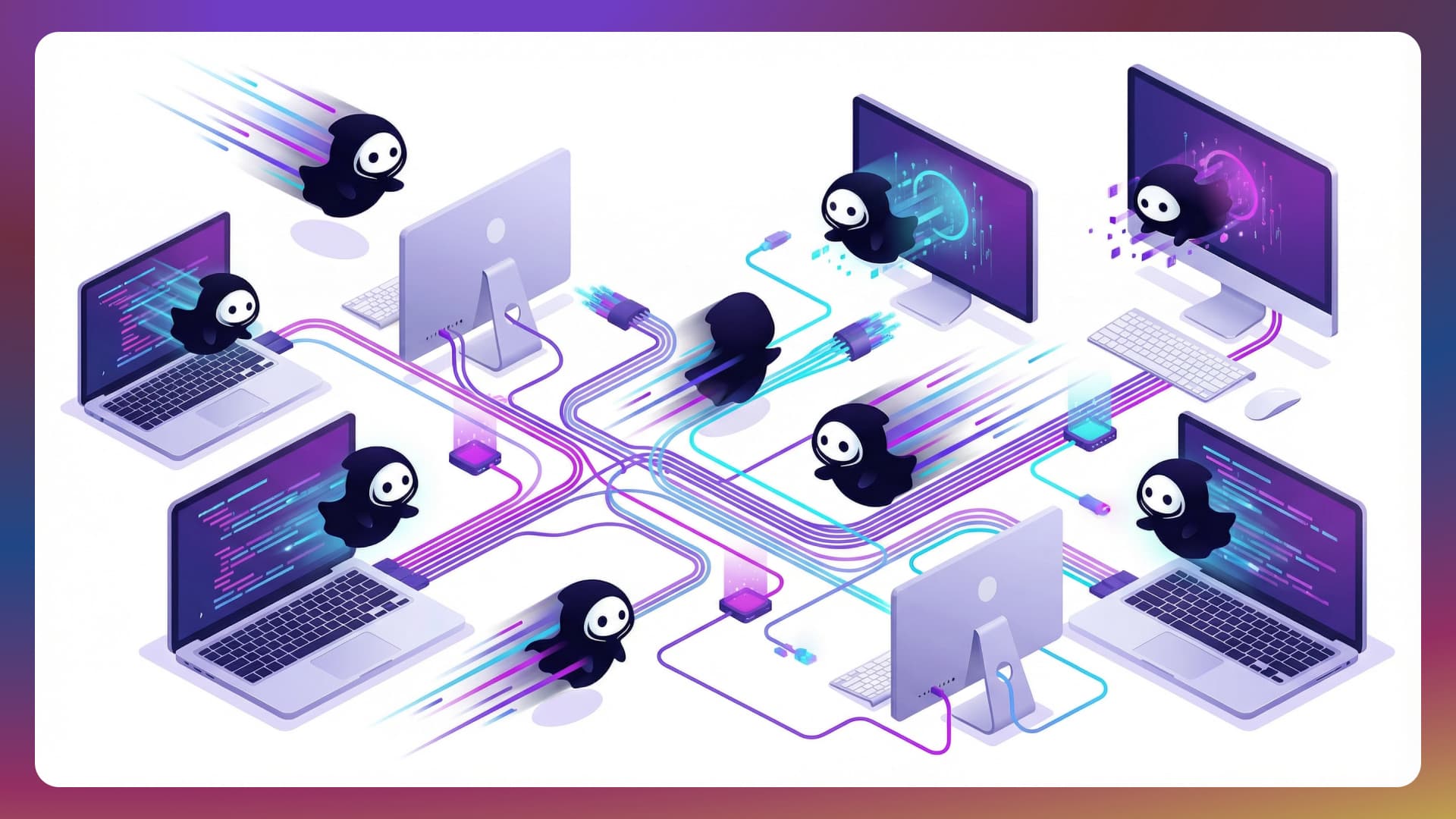
Claude Code + Nefia MCP server enables powerful remote workflows. Here are real-world examples.
Claude Code connects to the target PC via Nefia, scans the directory, and sorts files by type — all without touching the remote keyboard.
Start MCP server on your operator PC
Ask Claude Code
"Organize ~/Downloads on remote-mac. Move images to ~/Pictures, PDFs to ~/Documents/PDFs,
and everything else to ~/Downloads/Other."
Claude Code executes via Nefia
Everything AI agents need to operate remote PCs safely and at scale.
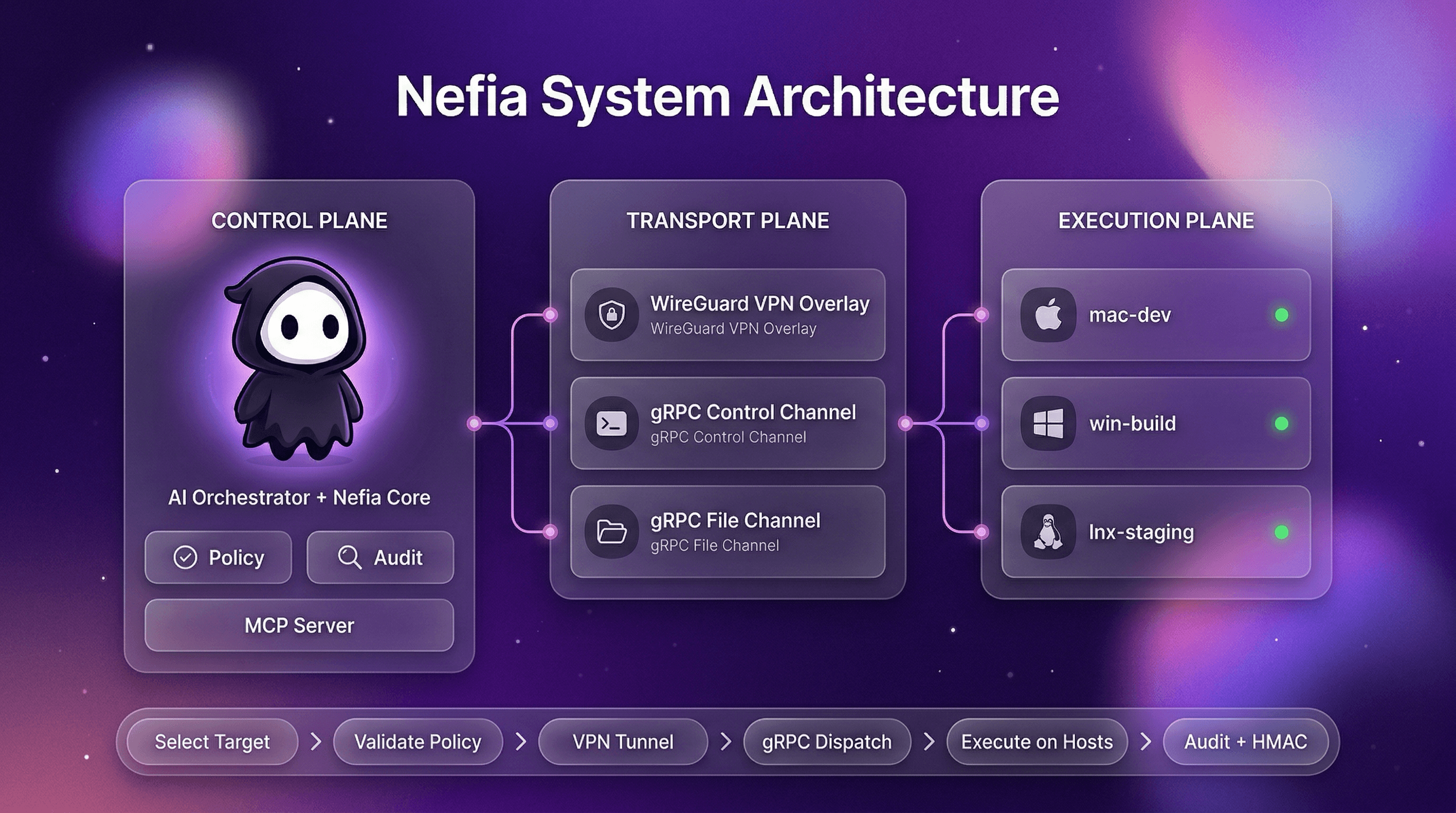
AI agents on the operator PC plan and execute remote operations end-to-end, governed by policy.
Expose the current 14 production-wired MCP tools so AI agents can manage remote PCs through a stable, secure interface. The repo already contains broader MCP schemas and workflow scaffolding, while today’s wired surface focuses on the tools connected end-to-end in the CLI entrypoint. Progressive discovery keeps token usage low, and errors include actionable hints so agents can self-diagnose and retry.
Safely run commands and file operations in parallel across thousands of target PCs with controlled concurrency.
Drive a managed Chromium instance on any target PC: navigate, click, fill forms, type, wait for selectors, read the DOM, upload files, capture screenshots, and stream console logs. First-class `nefia browser` subcommands and MCP tools let AI agents run complete web workflows — logins, scraping, SaaS administration — without installing a model on the target.
Observe, assist, or fully control the target desktop. Capture screens, move the pointer, click, drag, type keyboard shortcuts, read and write the clipboard, enumerate windows, and focus or resize them. `nefia desktop` exposes observe / assist / control modes with approval gates for privileged actions — AI agents can operate GUI apps that have no CLI equivalent.
A `nefia workspace` binds a team, host, and root directory into a first-class operator primitive that survives CLI invocations and operator restarts. Processes, browser sessions, and desktop sessions all anchor to a workspace — reattach hours later and pick up right where you left off. No more losing state when a long-running job outlives its shell.
Spawn, attach to, signal, wait on, and delete long-lived remote processes through `nefia proc` without SSH session semantics. PTY allocation, stdin piping, live output streaming, and operator reconnect are all supported; processes survive disconnects and retain output for 24 hours.
Every workspace confines operations to its configured root, preventing out-of-scope file access and path traversal attacks including Windows backslash exploits. Policy-denied paths are rejected at the daemon layer before touching the target.
Manage macOS, Linux, and Windows targets from a single operator PC. Operate with a unified command set regardless of OS.
`nefia sync` mirrors a local directory to remote hosts, transferring only changed files (size+mtime or SHA-256). `nefia push` distributes a single file or a batch of files to many hosts with rolling rollout controls (`--batch-size`, `--batch-wait`, `--subset`). Both support `--delete`, `--exclude`, and `--dry-run`.
Every plan includes all features — VPN, MCP, CLI, policy guardrails, and audit logs. Pick the tier that matches your scale.
Free
$0
Perfect for personal use
Team
$8
/member/mo
Per-seat pricing for teams of any size
Enterprise
Custom
For organizations with advanced needs
Run commands, transfer files, or let AI agents manage your fleet — all through encrypted VPN tunnels.
Dual Interface
Both interfaces share the same policy engine, audit trail, and VPN transport. Use whichever fits the workflow — or both together.
| Capability | CLI | MCP Server |
|---|---|---|
| Designed for | Human operators & interactive AI | Autonomous AI agents |
| Interface | Shell commands with text output | JSON-RPC with typed schemas |
| Tool discovery | --help / man pages | tools/list with progressive discovery |
| Input validation | Flag parsing | JSON Schema + enum constraints |
| Error recovery | Human-readable stderr | RecoveryTool + SuggestedActions |
| Approval workflow | — | Human-in-the-loop for destructive ops |
| Rate limiting | — | Token bucket per connection |
| Integration | Any shell / CI pipeline | Claude, Cursor, Windsurf, etc. |
Both CLI and MCP route through the same gateway — policy, audit, and VPN are always enforced regardless of interface.
Practical answers about security, operations, and integrations.
Yes, every target PC runs the lightweight `nefia-agent`. The agent establishes a WireGuard tunnel back to your operator daemon and exposes a typed gRPC runtime for command execution, file operations, process management, and browser/desktop automation — no inbound ports, no direct SSH exposure. Register agents by running `nefia vpn invite` on the operator side and the displayed one-liner on the target.
macOS (15+), Windows (11+), and Linux (Ubuntu 22.04+, Debian 12+, Fedora 38+) are supported for both operator and target PCs. ARM64 and AMD64 architectures are both supported.
No kernel modules, no root daemons. The WireGuard VPN runs entirely in userspace via gVisor netstack on both sides. The operator runs `nefia-operatord` as a user-level service; the target runs `nefia-agent` as a user-level service as well. Admin rights are only required once during installation to register the system service.
Yes. Nefia automatically classifies NAT type (EIM/EDM/CGNAT) and selects the optimal connection strategy. STUN discovers your public endpoint, and for strict NAT or firewalls, the DERP relay provides an immediate WebSocket-based fallback that auto-upgrades to a direct path when possible. Hairpin NAT is handled via automatic local endpoint discovery. Captive portal detection prevents futile connection attempts in restricted networks.
All data stays on your machines. VPN tunnels are end-to-end encrypted with WireGuard (Curve25519 + ChaCha20-Poly1305), and audit logs are stored locally in append-only format. The DERP relay is used at connection start for immediate connectivity and during enrollment, but auto-upgrades to a direct peer-to-peer path when possible. Even while traffic passes through the DERP relay, it remains end-to-end encrypted with WireGuard — the relay cannot inspect or modify your data.
The agent automatically reconnects with an adaptive watchdog that detects failures in 2 consecutive checks and triggers immediate tunnel rebuilds when network interfaces change. It runs as a system service (launchd on macOS, systemd on Linux, Windows Scheduled Task) with exponential backoff. After consecutive rebuild failures, the watchdog enters a cooldown before retrying — it never gives up permanently. Network monitoring detects IP address changes and triggers proactive reconnection before the tunnel times out. Multipath active-backup keeps a secondary path ready for instant failover. On the operator side, a circuit breaker distinguishes transient errors from persistent failures and connection health checks run with configurable timeouts. Send SIGHUP for live config reload (macOS/Linux) without restarting the service, and run `nefia-agent status` to check agent health at any time.
It combines mutually-authenticated agent tokens, workspace root sandboxing, policy rules (per-role command/path/host restrictions), device posture checks, mTLS gateway for MCP connections, and append-only audit logs with hash-chain integrity. For sensitive operations, the MCP approval workflow pauses AI agent actions until a human approves via the TUI dashboard or control plane. Just-In-Time (JIT) access grants temporary elevated privileges with automatic expiry. Multi-host exec commands show a preview and require confirmation before running, and `--dry-run` lets you preview target resolution without executing.
Nefia uses WireGuard with Curve25519 key exchange and ChaCha20-Poly1305 encryption — the same algorithms as kernel WireGuard. All runtime traffic (command execution, file operations, browser, desktop, process) rides typed gRPC over TLS 1.3 inside the WireGuard tunnel, giving end-to-end encryption with mutual authentication of operator and agent.
Private keys and auth tokens are stored in your OS keyring (macOS Keychain, Linux Secret Service, Windows Credential Manager). When the keyring is unavailable (headless servers, CI), a local file encrypted with AES-256-GCM is used as fallback. Plaintext credentials are never written to disk. Agent tokens are 256-bit cryptographically random values, also stored in the OS keyring, with a 90-day TTL and automatic background rotation every 24 hours as expiry approaches. The agent checks config file permissions at startup and warns if the file is world-readable when it contains a plaintext key.
Audit logs are append-only JSONL with SHA-256 hash-chain integrity — each record links to the previous one. Records are also signed with HMAC-SHA256, so any modification or deletion is detectable. Logs can be forwarded in real time to Splunk, Datadog, or a custom webhook endpoint via the built-in SIEM integration for external retention and alerting.
Invite tokens are signed with HMAC-SHA256 (key derived via HKDF from the operator's WireGuard private key) and include a single-use nonce for replay protection. Nonce lookups use an optimized index for fast validation at scale. Tokens expire after a configurable TTL (default 24 hours) with proportional grace periods based on token lifetime. Enrollment uses TLS 1.3 for the handshake with a progress countdown displayed during the process. Use `nefia vpn token-info` to inspect a token's expiry, target host, and remaining validity.
Yes. The built-in policy engine supports regex-based allow/deny rules for commands, file paths, and host access. You can define RBAC roles with different permissions and switch between warn and enforce modes. Policy changes take effect immediately via hot-reload. For temporary elevated access, Just-In-Time (JIT) grants let operators request time-limited privileges that auto-expire. Use `nefia policy test` or the batch variant to pre-check whether an operation would be allowed before executing.
Yes. macOS binaries are code-signed with a Developer ID certificate and notarized by Apple. Windows binaries are Authenticode-signed with a SHA-256 code signing certificate. All binaries include an Ed25519 signature that the agent verifies on startup and during auto-updates, ensuring you're running authentic, untampered builds.
Yes. Running `nefia mcp serve` exposes the current 14 production-wired MCP tools, allowing AI agents like Claude to execute commands, transfer files, gather system facts, inspect runtime state, and orchestrate the daemon-backed surface safely. The repository contains broader MCP schemas and workflow metadata, but the CLI entrypoint currently wires 14 tools end-to-end. The MCP server performs early parameter validation and returns domain-specific errors (e.g., FILE_NOT_FOUND, PERMISSION_DENIED) as structured isError content with actionable troubleshooting hints, so AI agents can self-diagnose failures and retry intelligently.
Yes. Register Nefia as an MCP server in your `openclaw.json` and OpenClaw gains access to the current production-wired MCP surface. Because OpenClaw runs autonomously 24/7, we recommend enabling approval workflows (`mcp.approval.enabled: true`) and strict policy rules (`policy.mode: enforce`) to keep operations safe. See the OpenClaw Integration guide in our docs for detailed security hardening steps.
Yes. Use `nefia plan exec` to generate a plan JSON, review it, then run `nefia apply` to execute. For interactive use, `nefia exec` targeting 2+ hosts shows a preview and requires confirmation. The `--dry-run` flag resolves targets and checks policy without executing. For AI agents, the MCP approval workflow pauses destructive operations until a human approves via the TUI dashboard. In non-TTY environments (scripts, CI), pass `--yes` to skip the interactive prompt.
The Free plan is built for personal use: up to 2 hosts in a single-user workspace. The Team plan ($8/member/month) unlocks unlimited hosts, unlimited members, and shared team collaboration. The Enterprise plan adds invoice and annual billing, a dedicated support engineer, and priority support — contact sales for details.
Nefia uses UDP port 51820 for WireGuard by default (configurable). If you use `--stun`, no manual port forwarding is needed in most cases. When using the DERP relay, only outbound WSS (port 443 or 8443) is required — no UDP port forwarding is needed at all. All runtime gRPC traffic flows inside the WireGuard tunnel, so no target-side inbound ports need to be exposed to the public internet.
Nefia includes a built-in error code registry. When an operation fails, the error message includes a structured code like E2001. Run `nefia explain E2001` to see a detailed description and step-by-step resolution instructions. Use `nefia explain --list` to browse all registered error codes. For VPN connectivity issues, run `nefia vpn diagnose` to measure per-host latency (warns above 500 ms, errors above 2 s) and detect VPN subnet route collisions. Run `nefia doctor` for a comprehensive health check covering configuration, VPN, and audit subsystems. The documentation site also has a complete Error Codes reference page.
DERP (Designated Encrypted Relay for Packets) is a WebSocket-based relay server that provides immediate connectivity for peers behind strict NAT or firewalls. Nefia uses a relay-first architecture — connections are established through the DERP relay instantly, then automatically upgrade to a direct peer-to-peer path when possible. All traffic through the relay remains end-to-end encrypted with WireGuard. You can use the managed relay or deploy your own with the `nefia-derp` binary for full control over relay infrastructure.
The nefia-agent supports automatic log rotation via the `--log-file` flag. Default log paths are platform-specific: `~/Library/Logs/nefia/agent.log` on macOS, `$XDG_STATE_HOME/nefia/agent.log` on Linux, and `%LOCALAPPDATA%\nefia\logs\agent.log` on Windows. Use `--log-max-size` (default 50 MB), `--log-max-backups` (default 5), and `--log-max-age` (default 30 days) to control rotation behavior. Old log files are automatically cleaned up.
Run `nefia posture check` to evaluate target security signals — firewall status, disk encryption, OS version — against policies. In enforce mode, non-compliant devices are blocked from operations. In warn mode, issues are logged but operations proceed. Results feed into compliance reports.
Nefia resolves secrets at execution time from five providers: environment variables, local files, HashiCorp Vault, AWS Secrets Manager, and 1Password (via op CLI). Secrets are injected into commands and playbooks without storing plaintext in config files. Use `nefia secrets list` to see configured providers and `nefia secrets test` to verify provider connectivity.
Yes. Run `nefia compliance report` to auto-generate compliance reports covering SOC 2 (14 controls), ISO 27001 (12 controls), or HIPAA (11 controls). Reports are built from your audit logs and configuration state, with HTML output ready for auditors. The MCP tool `nefia.compliance.report` lets AI agents generate reports programmatically.
Run `nefia agent upgrade --target all` to upgrade agents across your fleet remotely. Updates are verified with Ed25519 signatures. If a new agent version fails to start, automatic rollback restores the previous version. Use `nefia agent pin` to lock a host to a specific version.
Nefia provides two complementary systems. Beacons run on agents and monitor conditions like disk usage thresholds, service health, or custom scripts. When a beacon fires, the operator-side reactor matches the event against rules and executes automated responses — commands, file operations, or notifications. Use `nefia.reactor.status` and `nefia.reactor.events` to monitor rule hits and recent events.
Yes. Use `nefia schedule create` to define cron-based recurring playbook executions. Schedules support IANA timezones, overlap policies (skip, queue, or allow concurrent runs), missed-run handling, and configurable retry counts. Manage schedules with `nefia schedule list`, `show`, `enable`, `disable`, and `history`. All 8 schedule tools are also available via MCP for AI agent orchestration.
Commands targeting offline hosts are automatically queued for later execution when the host reconnects. Use `nefia queue list` to see pending entries, `nefia queue show` for details, and `nefia queue cancel` or `nefia queue retry` to manage them. Queued entries have a configurable TTL (default 1 hour) and expire automatically if the host does not come back online in time.
Use `nefia push` to distribute a file to all hosts matching a target selector, or `nefia sync` to synchronize an entire directory — only changed files are transferred. Both support `--batch-size` and `--batch-wait` for rolling deployments, `--subset` for canary testing on a random subset, and `--dry-run` to preview which hosts would be affected without writing any files.
Yes. Session recordings capture all commands and file operations in asciicast format for audit and replay. Use `nefia recording list` to browse recordings and `nefia recording show` to inspect metadata. Recordings can be deleted with `nefia recording delete` when retention policies allow.
The `--batch-size` and `--batch-wait` flags enable rolling execution across large fleets. For example, `nefia exec --target group:prod --batch-size 5 --batch-wait 30s` restarts a service on 5 hosts at a time with a 30-second pause between batches. Use `--subset N` to test on a random subset first, and `--rerun failure --last-job-id <id>` to retry only the hosts that failed in a previous run.
Nefia includes a built-in SSH Certificate Authority. Use `nefia sshca` to issue short-lived SSH certificates for hosts and users, eliminating the need to distribute and manage individual SSH keys. Certificates include principal restrictions, validity periods, and critical options. This is especially useful for large fleets where key rotation at scale is impractical.
Yes. The operator CLI supports Raft-based clustering via `nefia cluster` for high availability. Multiple operator nodes form a consensus group with automatic leader election, log replication, and a Unix socket admin API. This ensures that if the primary operator goes down, another node takes over without manual intervention.
Documentation
Follow the command guide through guided setup, host validation, session workflows, and MCP setup. Step-by-step instructions from first run to safe production operations.